Feature
Folders that fill themselves.
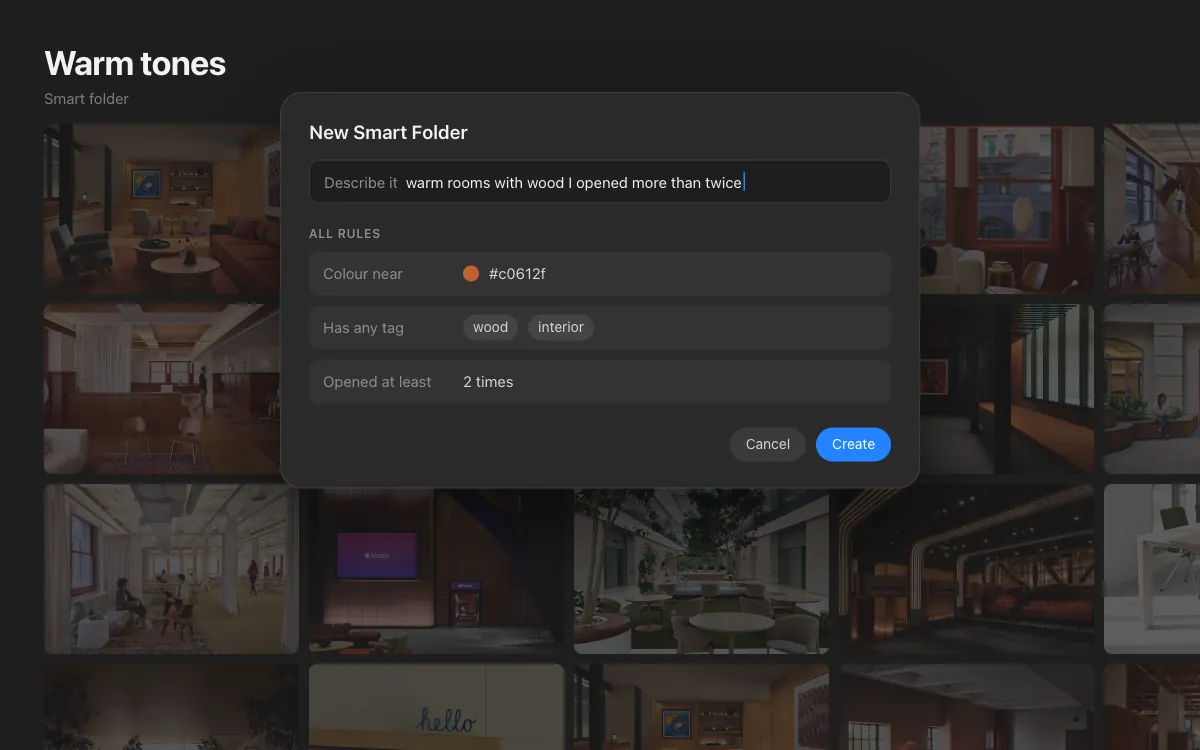
A Kosmica smart folder collects every item that matches its rules, now and later. Write the rules yourself, or describe the folder in a sentence and Kosmica turns it into rules on your device.
$14.99 once for Mac and iPhone · No subscription · macOS 26 and iOS 26
At a glance
- Rules
- Kind, tags (any, all or none), label, text contains, site, added in the last N days, colour near, opened at least N times
- Match
- All rules or any rule
- Describe it
- Type a sentence, get the rules, with Apple Intelligence
- Built in
- Recently Added (last 7 days) and Similar
- Shortcut
- ⇧⌘N on Mac
How it works
Create a smart folder
Choose New Smart Folder from the sidebar plus menu, or press ⇧⌘N on Mac.
Describe it or add rules
Type something like “links about furniture I opened more than twice”, or add rules one by one and choose whether all or any must match.
It keeps itself current
New saves that match land in the folder on their own. Change the rules whenever you like.
Good to know
- Kosmica smart folders work inside your Kosmica library. They are separate from Finder smart folders, which search files on your Mac.
- Describe it uses Apple’s on-device model, so it needs Apple Intelligence. Rules you add by hand work without it.
- Smart folders sync with the rest of your library through iCloud.
Questions
What can a Kosmica smart folder match on?
Kind (image or link), tags (any, all or none), Vision labels, text in the name, title, summary or image, the site a link comes from, how recently it was added, a colour near a hue, and how many times you opened it. Choose whether every rule or any rule must match.
What does “Describe it” do?
It turns a sentence into rules. Type “links about furniture I opened more than twice” and Kosmica writes the matching rules for you to check before you save. It uses Apple’s on-device model, so it needs Apple Intelligence, and your words stay on your device.
Are these the same as Finder smart folders on Mac?
No. Finder smart folders search files on your disk. Kosmica smart folders search the images and links in your Kosmica library, using things Finder does not know about, such as Vision tags, text inside images, palettes and how often you opened an item.
Do smart folders update by themselves?
Yes. A smart folder is a saved set of rules, not a copy of items. Anything you save later that matches shows up in it right away, and an item that stops matching leaves it. The built-in Recently Added folder works the same way with a 7-day rule.
Keep exploring
- Feature
Colour palettes and colour search
Every image keeps its palette. Search by colour name or hex.
- Feature
Collections and shared collections
Boards for projects and moods. Share one through iCloud.
- Use case
Best Mac app for organizing screenshots
New screenshots collect themselves, and the text in them is searchable.
- Use case
Best Mac app for saving links
Links saved with a snapshot, a title and a summary, next to your images.